



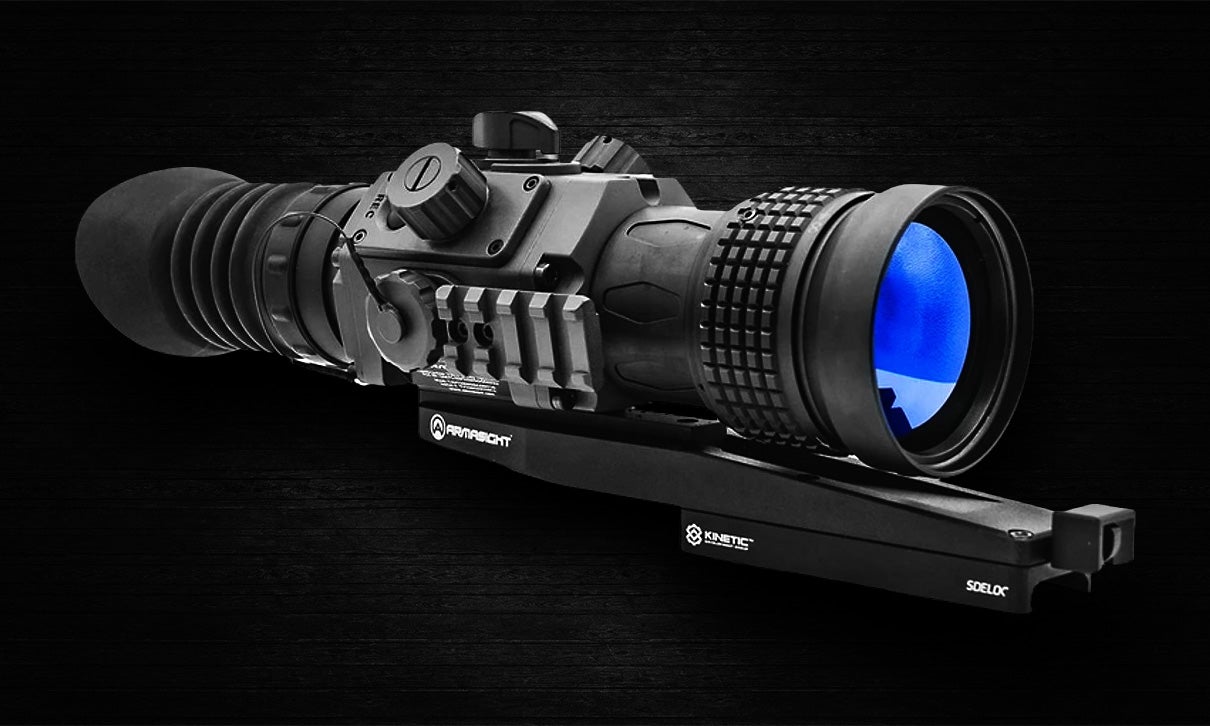

I’ve referred to the ability to see in the dark as a genuine superpower in the field, and while both modern night vision and thermal optics serve their own unique purposes, I’d be willing to call thermal technology a super-duper power, at least in the case of the Armasight Contractor 640.
Until the good folks at Armasight offered me the opportunity to review the Contractor 640, my experience with thermal rifle optics had been relatively minimal. Like most people, my lack of experience is mostly due to the cost of entry, and asking myself whether the juice is really worth the squeeze. I’m going to answer that definitively in this article, but not quite yet.
What’s in the box?
In the box, you’ll find the Contractor 640 equipped with a Kinetic Development Group quick-detach mount, USB-C cable, thermal zeroing target, a pair of CR123A batteries, soft case, microfiber lens cloth, product manual, and a warranty card that doubles as a hand-signed welcome to the Armasight family. Nice touch! I pulled the sight from the box like someone who has never received a package in their life, and was taken aback by how rugged the Armasight Contractor 640 feels in my hands. I don’t know whether to mount it to a rifle and take it hunting or simply beat a bison to death with it. My initial impression is that Armasight meant for the Contractor 640 to be used on duty by the military and law enforcement. We’re off to a great start.
Controls & Construction
Manipulating the features and functions of the Contractor 640 is reasonably straightforward thanks to the simple control layout. The top dial powers the optic on and off; however, it must first be pressed in before rotating, protecting against accidentally draining your battery while not in use or turning the thermal off while in use. The devil is always in the details.
The left and right side turrets are used to navigate menus and make selections. Aside from scrolling through options as you rotate them, these dials operate various menu functions of the Contractor 640 through either brief or long presses. Lastly, an external record button sits directly behind the right-side turret, another detail I appreciate, as it makes it easier to start and stop recording without navigating a menu.

The right side of the Contractor 640 also features a USB-C port protected by a threaded, tethered cap in a nicely weather-sealed compartment. Just forward of that, you’ll find a side-mounted, removable Picatinny accessory rail that can be used for a rangefinder, auxiliary weapon sight, laser aiming module, light, or whatever your heart desires. You could mount an IR illuminator there if you need it for night vision gear; however, keep in mind that IR devices do not work with thermal imaging.

On the left side of the Armasight Contractor 640, you’ll find a weather-sealed and tethered battery cap secured by a set screw that can be loosened or tightened by hand, revealing a well-protected dwelling for the provided pair of CR123A batteries. Armasight rates battery life at approximately four hours at 68 degrees Fahrenheit. I’d say this is conservative, as I experienced close to five hours in a much colder environment during testing, between negative five and ten degrees, give or take.
It’s important to note that recording capability will be discontinued, and any current recording will stop when the low battery warning appears. This is meant to prolong the hunt as long as possible before killing the batteries. This was not an issue for me, however, as I typically went out with a fresh set or carried an additional set of rechargeable CR123A batteries. If you choose, you can also run an external power bank via USB-C as long as it is 12 volts or less, but I would rather not do that as I prefer to keep everything weathersealed in the field.
The rear of the Contractor 640, behind the ultra-smooth diopter adjustment, features a removable rubber eyecup, which came in handy from time to time, though I found myself using the optic without it when the heat from my face would fog the outside of the ocular lens. On the objective end, Armasight equipped the Contractor 640 with a wide focusing ring featuring grippy knurling, making fine-tuning range adjustments that much easier. A rubber cover is also included to protect the large 50mm objective lens, and like the battery and USB-C compartments, it is also tethered to the optic.

The body of the Contractor 640 is MIL-STD constructed of a durable alloy, giving the optic its rugged feel while maintaining a compact 8.2” in length that hits the scales at 1.93 pounds, about the weight of a Nightforce ATACR 4-16x42mm F1. But it’s not only about feel, as the Contractor 640 is rated for the heavy recoil of a .50 caliber BMG, demonstrating its durability inside and out. Everything about Contractor 640 screams duty use, from its armor-like construction to simple aspects like tethering small parts you don’t want to lose in the field. After spending some freezing winter months shooting this optic in some very austere conditions, I have no doubt as to the Contractor 640’s ability to withstand the most challenging missions and the harshest environments. Overall, I have to rate the construction and controls of the Armasight Contractor 640 as good as they come.
Technology
The heart of the Contractor 640 is built around Armasight’s proprietary ArmaCORE 12 micron thermal core, which can detect a man-sized heat signature at up to 932 meters (1019 yards) away by combining extensive detection capabilities with a rich, detailed image through onboard processing. Heat signatures are projected onto a high-definition XGA 1024×768 AMOLED display, with five user-selectable color palettes – white hot, black hot, target, rainbow, and sepia, allowing shooters to adapt the Contractor 640 to their specific preferences or environment. Truth be told, Armasight went conservative here as well. I was able to identify targets a bit farther, briefly picking up coyotes one night at approximately 1200 yards, and larger livestock even further out. Since most of my testing occurred in a freezing environment, it is noteworthy that I was able to detect heat signatures just as well at longer distances under bright sunlight in warmer weather once winter had passed, demonstrating the optic’s extreme thermal sensitivity. This, along with the Contractor 640’s excellent resolution, provides a stunningly detailed and usable image.

I’d also note that the image quality, when viewed through the optic, exceeds the compressed photo and video quality downloaded from the internal memory, so photos do very little justice here, and if you want to experience the real thing for yourself, well, now you know who to call.


Additional features of the Armasight Contractor 640 include a digital compass and inclinometer to assist in calculating range, azimuth of fire, and cosign angle, increasing accuracy at extended range by providing the user with valuable information for a comprehensive shooting solution. The optic also features onboard image and video recording, with the ability to transfer media or even stream the view from your Contractor 640 to a compatible device via Wi-Fi, Bluetooth, or USB-C. Armasight even has an app for that!
With all these features hitting their mark, it was easy to dial in a clear image under every weather condition I faced, from rain to snow to heavy fog. Additional information provided through the Armasight Contractor 640 interface was also helpful in developing accurate firing solutions, especially at longer distances, where every last consideration can make the difference between a hit and a miss. Lastly, I found the built-in rangefinder function great to use in a pinch when I forgot to bring my laser rangefinder.


Menus
At the top left of the Contractor 640’s display, you will see your current color palette and preset settings side by side. Rotating the left turret will scroll through the white hot, black hot, target, rainbow, and sepia palettes by default. Pressing the turret in once switches to preset control, which allows rotation of the turret to select a preset that provides the best image for your environment. Holding the left turret down for a long press will bring up the Detailed Menu.
The Detailed Menu, intimidating as that sounds, is quite simple to navigate and offers excellent features to dial in the Contractor 640, not only to your personal preferences but also to environmental factors. The Detailed Menu will appear on the left side of the screen, with icons arranged vertically, beginning with Enhancement, which allows the user to adjust contrast, sharpness, brightness, gain, compass calibration, and picture-in-picture (PiP) features. These controls provide additional image tuning beyond factory presets, allowing shooters to adjust precisely to their needs.
While making adjustments in any section, long-pressing the left turret will return you to the main Detailed Menu.
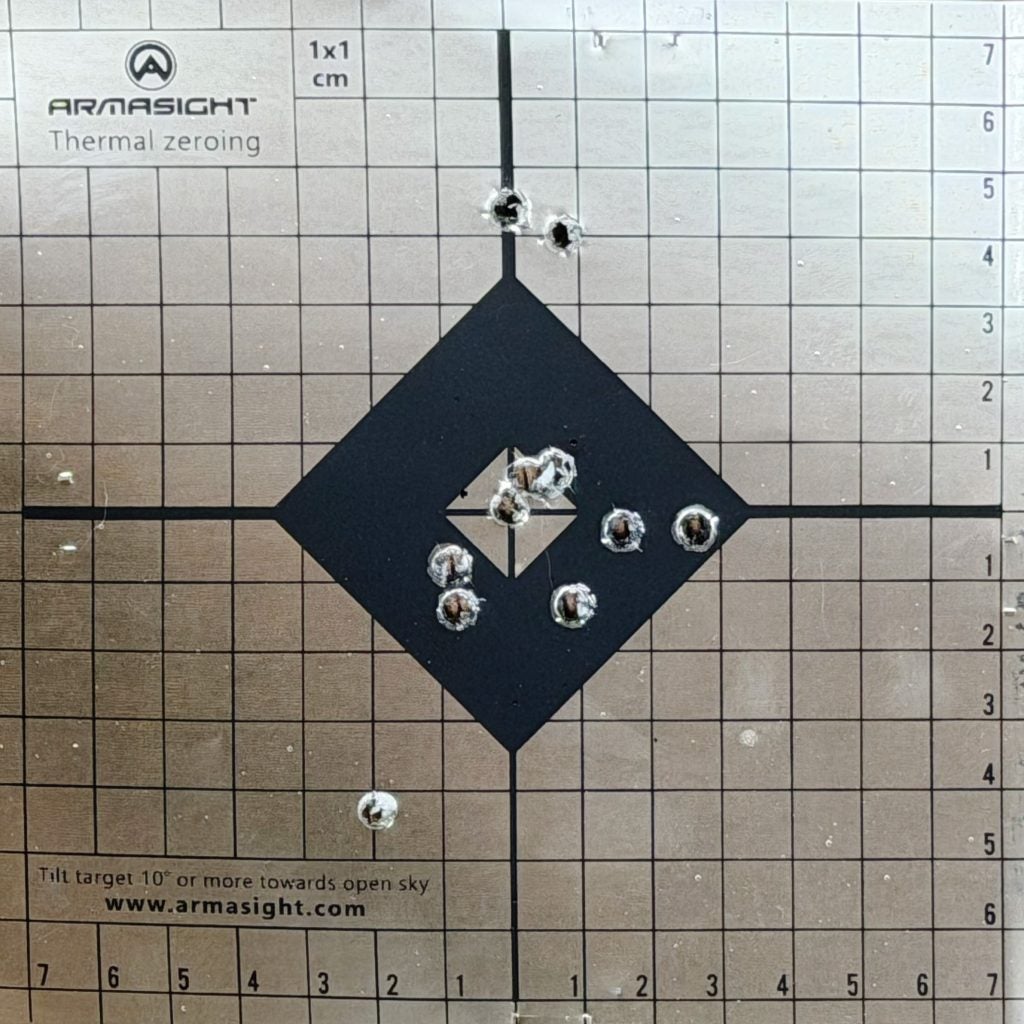
The next menu item, and one of my favorite digital optic features, is the boresight menu. Once selected, shoot a group, I prefer five shots, maintaining a consistent point of aim. Next, move the auxiliary reticle on the screen that looks like an X from your point of aim to the center of your group using the left turret to adjust elevation and the right turret to adjust windage. Once finished, press the right turret for three seconds to accept the changes. The Armasight Contractor 640 will automatically adjust the main reticle, and your zero is now good to go. I like to shoot an additional group at this point to confirm.
This is a great time to briefly discuss the thermal zeroing target that comes with the Contractor 640. Zeroing a thermal optic requires a heat signature small enough to be precise, yet with enough temperature contrast to acquire a positive point of aim. There are plenty of ways to do this using black electrical tape and so on, but hats off to Armasight for including a great, out-of-the-box solution.
The target uses natural light to provide an aiming point with temperature differences the Contractor 640 can focus on, using a high-contrast center and a surrounding grid of 1x1cm to help with fine adjustments. The Thermal Zeroing Target uses a sticky adhesive to affix it to any backing, and additional targets are available from Armasight.
The next stop in the Detailed Menu is your Preview selection, which is self-explanatory. This is where you can preview images and videos recorded with the Contractor 640. This is followed by the Compass selection, which lets you adjust visual settings for the on-screen compass display and calibrate it when necessary.
The Settings menu is where you will look to turn on or off Bluetooth and Wi-Fi functionality. It is also where rifle profiles are stored. This is a really nice feature, as the Kinetic Development Group quick-detach mount is designed to return to zero when installed or removed.
This means you can save profiles for multiple platforms, various loads on the same rifle, or perhaps suppressed or unsuppressed. You get the idea. But does it work? Absolutely. I was able to remove and reinstall the Armasight 640 Contractor on a different rifle, then move it back to my American Defense Manufacturing UIC MOD-2 18″ SPR and continue to maintain my zero.


This menu is also where you can set the Contractor 640 to initiate recording based on recoil, another clever feature that records 10 seconds before and 10 seconds after the shot, or records continuously if multiple shots are taken. Lastly, the Settings menu lets you select metric or standard measurements, format your internal memory, or reset the optic to factory settings.
The Detailed Menu is capped off with an About section that tells you which software version is currently installed and lets you change languages.
Moving back to the main display, rotating the right side turret controls magnification. Pressing it in once triggers a manual NUC/FFC event, or delays one if an automatic countdown is in progress. Sounds scary, right? Nothing to fear. I’ll confess that this tech goes a bit over my head, but the function is related to preserving image quality by calibrating the sensor. In my experience, this does not disrupt function at all, but I did not delve too deeply into the subject or notice the overall effect when I used it.
Long-pressing the right side turret pulls up the Quick Menu on the right side of the display. The first Quick Menu item controlling presets is redundant with the left-side turret functions, as it controls both palette and preset options. While in this mode, the left turret will scroll through palettes while the right turret scrolls through presets, and like always, a long press of the right turret will return you to the Quick Menu.

The next item on the Contractor 640’s Quick Menu is Reticle Types, which allows the shooter to select between eight different reticle styles, including five crosshair variations, a chevron type, a simple dot, or no reticle in the image at all. This brings us to the following menu item, Reticle Colors, another self-explanatory feature that lets the user select between black, green, cyan, yellow, red, or white. Display Brightness is the next item in the Quick Menu, offering 10 user-selectable brightness levels.
The final stop on the Quick Menu is the built-in stadiametric rangefinder. When in rangefinder mode, a pair of horizontal lines will appear in the middle of the display, with a size measurement on the left and yardage on the right. Use the left turret to adjust the size as accurately as possible to an object down range with a familiar measurement. For example, if you have a target with a known height of ten inches, then dial that in. Next, use the right turret to widen or compress the horizontal lines to the top and bottom of the target. Based on these calculations, the rangefinder will now display your calculated distance from the target.
The last thing I want to mention in this section is that both right and left side turrets on the Armasight Contractor 640 are lockable by pressing them in three times in quick succession. This is a smart feature that will keep shooters from making unwanted changes to the setup as their rifle bumps into gear or what have you. Quickly repeating the triple press will restore full functionality of the turrets.

Final thoughts
Before we go any further, I would like to thank Armasight for sending out the Contractor 640 for review. They have been amazing to work with and make outstanding products. I would also like to thank American Defense Manufacturing, whose UIC MOD-2 18″ SPR was the rifle I chose to test the Contractor 640 on. It is dead nuts accurate and smooth-shooting, and my full review of it will be forthcoming.
Lastly, I would like to thank HOP Munitions, Black Hills Ammunition, and AAC Ammunition (Palmetto State Armory) for providing me with some of the greatest 77gr rounds I could ask for to conduct this review. Without all of you, none of this would have been possible.
–HOP Munitions .223 77gr HPBT
–Black Hills 77gr Open Tipped Match
–AAC 77gr Open Tipped Match
Getting comfortable behind the Armasight Contractor 640 is incredibly easy, starting with reduced eye fatigue that I attribute not only to the display but also to its refresh rate, which produces a smooth image. The resolution is outstanding compared to other thermal sights I’ve had the oppertunity to put to use, making positive target identification easier when trying to discern the difference between various types of animals at distance.
The controls are intuitive, reliable, and easy to operate while remaining on target, and the menus are simple to navigate, earning the Contractor 640 an A+ in ergonomics. I really appreciate the ability to dial in the image quickly to suit my preferences, making setup fast and simple, perfect for those times when I’m standing out in the middle of a pasture with minimal light, and especially nice when it’s freezing outside and I need to minimize exposure. That’s not the time you want to be fiddling with things for ten minutes. I can manage this in less than a minute with the Contractor 640.
As for ruggedness, the Contractor 640 has to be as tough as they come, or at least as tough as I have seen. I experienced zero issues with reliability, despite fumbling around in the dark and taking bumpy rides out into the middle of nowhere with a bunch of gear banging around in the truck. This subject is easily put to bed. Armasight built a tank out of this optic without making it excessively heavy.

The Armasight Contractor 640 has so many features that I may miss a few, even in a comprehensive review. But it’s time to answer that question. Is the juice worth the squeeze? With an MSRP of $4999, this is a fundamentally important concern, to which the answer is a resounding yes. I honestly thought this optic was terrific, and I wish I still had it in inventory. For me, it is just unreasonable to go on without one, and I suppose it’s a solid enough endorsement to say that I’m absolutely going to buy one… as soon as I write a ton more articles, collect on owed debts, and perhaps get a few Powerball numbers right.
I’m curious how many readers out there have dipped a toe into the world of thermal optics, or how many of you plan to in the future. Let us know your thoughts on the technology in general, and on the Armasight Contractor 640 in the comments below. As always, shoot straight, and thanks for reading.
For more information on Armasight and their entire line of night vision and thermal Godsends, please visit armasight.com.
More on TTAG:
Read the full article here
